
















From touchscreen and QR code devices to NFC cards and models that only support Bitcoin, this guide compares hardware wallets based on security, connection methods, ease of use, and recovery options to help users choose the right product.
A hardware wallet is a device used to protect the private keys required for accessing cryptocurrency exchanges. In simple terms, your encrypted assets remain on the blockchain, while the hardware wallet stores the keys that allow you to access those assets.
The main differences between various wallets lie in: which cryptocurrencies they support, how to connect them to a phone or computer, and how to view and confirm transactions. This guide explains these differences and what they mean when choosing a wallet.
How do we evaluate these wallets?
Cointelegraph tested Trezor Safe, Ledger Stax, Flex, Nano Gen5, Nano X, Nano S Plus, and Coinkite's Opendime. The testing was conducted using smartphones and computers running Linux and macOS systems, in conjunction with third-party and official software. Opendime was used for cold storage; other devices were utilized to test simple transactions and decentralized application interactions. The evaluation of the remaining models mentioned in the text is based solely on public information.
These evaluation units were provided free of charge by Ledger, Trezor, and Coinkite at the request of the article author for the purpose of evaluating the devices. The relevant companies did not pay any remuneration and nor did they make any commitments to provide positive coverage.
What does a hardware wallet protect?
Hardware wallets separate transaction signatures from mobile phones or computers. This reduces the risk of malware on either device stealing private keys, thereby preventing cybercriminals from accessing your digital assets.
Most hardware wallets are also equipped with a screen, allowing you to check the details of transactions on the wallet itself. This means that even if the smartphone or computer connected to the wallet deliberately displays incorrect information in an attempt to trick you into signing malicious transactions, you still have the chance to detect the issue before signing.
However, this protection also has its limitations. The wallet must display sufficient information so that you can understand what you are approving. You may still lose funds by approving fraudulent transactions, leaking recovery backups, or using wallet software with vulnerabilities.
Your recovery backup also needs to be properly protected. Anyone who obtains the backup could potentially restore your wallet and access the funds within it.
Hardware wallets for various cryptocurrencies
If you hold more than one type of cryptocurrency, the first thing to check is whether your wallet supports the currencies you possess and the network you are using. You also need to see which functions can be achieved through the manufacturer's app, and which require the use of other applications.
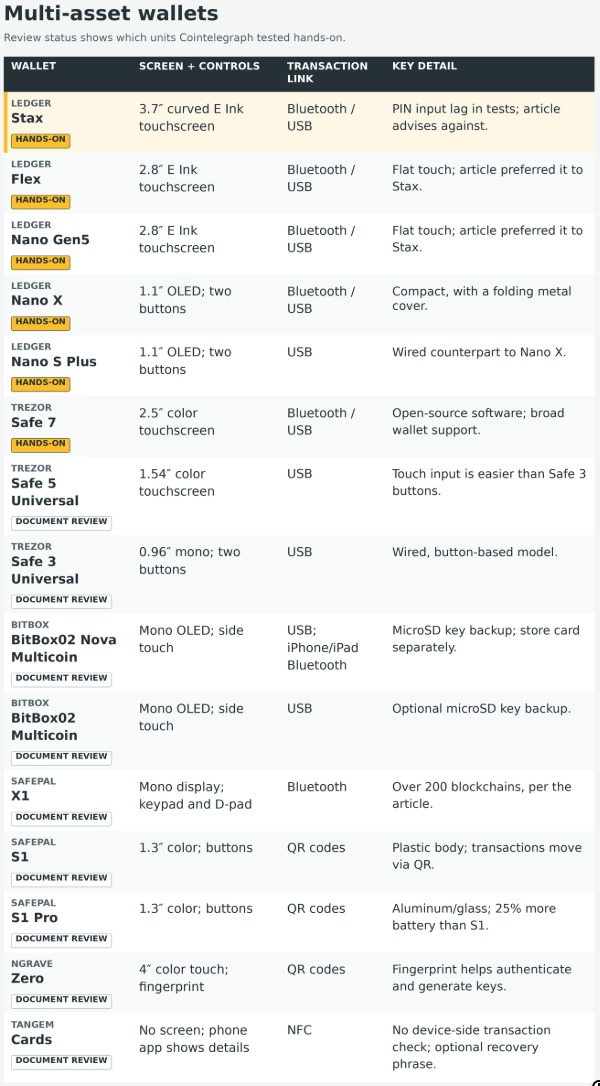
The following table covers multi-asset versions, and all specifications are from the manufacturer's documentation.
Ledger hardware wallet product line. Source: Ledger
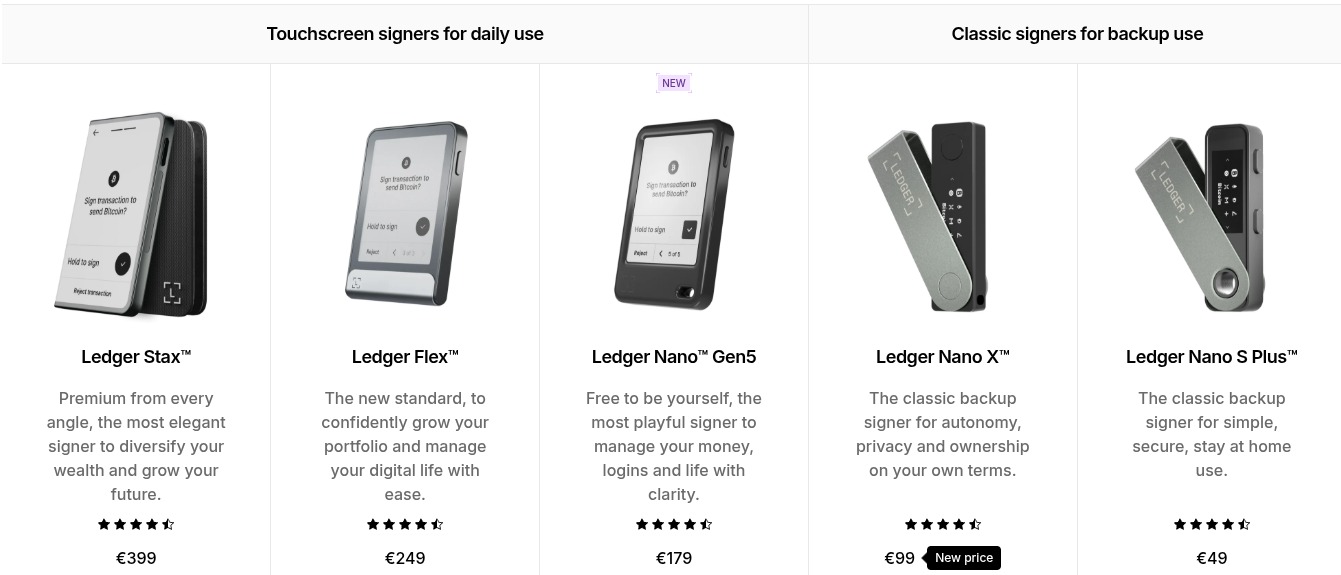
Ledger's Stax, Flex, Nano Gen5 and Nano X can be connected via Bluetooth or USB.
Stax is equipped with a 3.7-inch E Ink touchscreen that extends from the front of the device and wraps around one side. Flex and Nano Gen5, on the other hand, use flat rectangular 2.8-inch E Ink touchscreens.
Nano X is equipped with a smaller 1.1-inch OLED screen and two physical buttons. Its foldable metal cover gives it a look that resembles a USB flash drive.
Cointelegraph discovered during the testing of each Ledger device that the most expensive Stax in the product line seems to have latency issues, and the manufacturer has confirmed that this is a result of its surround-screen design.
This latency is perceived as input lag, resulting in repeated errors when entering the PIN code, and the input speed is much slower than on other devices. Therefore, we do not recommend this device, as we have found that cheaper touchscreen models offer a much better user experience.
Trezor Safe 7 is a color touch-screen hardware wallet with completely open-source software; whereas Ledger uses certified secure component chips, which legally restricts Ledger from opening-sourcing some of its software.
Both are roughly identical in practical functionality, supporting a wide range of third-party software, thousands of digital assets, as well as dedicated management software for both computers and mobile devices.
Trezor Safe 7. Source: Trezor
BitBox02 Nova Mult Token Issuance in is a universal hardware wallet that supports Bluetooth, featuring capacitive control with a OLED display screen and is compatible with mainstream platforms. It also allows users to back up their private keys to a microSD card, which is the first device mentioned in this text to have this functionality. This card needs to be kept separately from the device and properly secured.
BitBox02 Nova Mult Token Issuance in. Source: BitBox
SafePal X1 is different from the aforementioned devices; it is equipped with a full keyboard, a simple monochromatic interface, and low-cost Bluetooth connectivity. This hardware wallet offers wireless connection at an exceptionally low price and supports over 200 blockchain networks. Normally priced at around $70, it is currently available for $29.99 through the Changelly wallet marketplace, which is about 57% lower than the regular price.
SafePal X1. Source: SafePal
Next are wired universal hardware wallets. This category includes Nano S Plus from Ledger, Safe from Trezor, Universal, Safe, and Universal; as well as the BitBox02 Mult token issuance in. They are connected to supported computers and devices through USB. Nano S Plus is almost identical to Nano X, except that it can only communicate via wired connections.
Ledger Nano S Plus. Source: Ledger
Trezor's Safe, Universal, and Safe all come with 3, while Universal has 5. Trezor is equipped with a color touch screen, whereas the latter ones have a monochromatic display and two buttons. Both have similar functions, but Safe and Universal are significantly more convenient in terms of input and output.
Trezor Safe 5 and Safe 3. Source: Trezor
Finally, the BitBox02 Mult token issuance in is the wired monochromatic touchscreen hardware wallet option from this Swiss company. Similar to the BitBox02 Nova Mult token issuance in, this model also supports backing up keys to a microSD card.
BitBox02 Mult Token Issuance in. Source: BitBox
Wallets that use QR codes
SafePal S1, S1 Pro, and Ngrave Zero exchange transaction data through QR codes displayed on screens or scanned by cameras. This allows users to sign transactions without the need for USB or Bluetooth data connections. These devices still use USB for charging and firmware updates. Users still need to verify the content they approve of; merely having a QR code does not ensure that a transaction is automatically secure.
SafePal S1 and S1 Pro are essentially the same device: both are hardware wallets based on QR codes and come with the same color screen. However, the Pro version is made of aluminum and glass, whereas the standard version is made of plastic. The Pro version also has 25% more battery capacity, but that is essentially the only difference between the two.
SafePal S1 Scan the QR code on your phone to sign the transaction. Source: SafePal
Ngrave Zero is a type of air-gap hardware wallet similar to smartphones, equipped with a color touch screen, and its interface also resembles that of mobile applications. The device is also fitted with a fingerprint sensor for authentication, which, together with a random number generator and ambient light data, serves as a source of randomness when generating keys.
Ngrave Zero. Source: Ngrave
Wallet card based on NFC
Finally, the Tangem wallet card is a hardware wallet based on Near Field Communication (NFC). It does not have an independent screen, which means that if your device is compromised and someone tries to trick you into signing a transaction that differs from what is displayed on the screen, the wallet itself cannot alert you. Users interact by bringing the card close to their phone.
Tangem provides two settings methods: with and without mnemonics. For wallets created without mnemonics, keys are generated within the card. If you choose to create a wallet with mnemonics, the mobile app will generate the mnemonics and transfer the resulting keys to the card.
Tangem Wallet Card. Source: Tangem
Hardware wallets that only support Bitcoin
If you only use Bitcoin, Trezor and BitBox provide Bitcoin-only versions of the multiple wallets mentioned above. These versions do not support other cryptocurrencies. Buyers still need to consider how to verify transactions, protect backups, and keep their device software up-to-date.
Bitcoin-only Hardware Wallet Comparison Table. Source: Cointelegraph
Coldcard Mk5 of Coinkite is a hardware wallet with a numeric keyboard, while Coldcard Q comes with a larger screen, a full keyboard, and a camera for scanning QR codes. They can be used in conjunction with compatible wallet software, such as Sparrow, for preparing transactions.
In July 2026, Coinkite warned that the affected Coldcard firmware might generate wallet keys that are easier for attackers to guess. This issue affects multiple models and software versions.
In the update on August 24th, Galaxy Research's Alex Thorn attributed approximately 1,789 BTC coins, which were stolen from 8,865 addresses, to this vulnerability. Calculated at the price at the time of theft, these bitcoins are worth about 114.7 million US dollars.
Coinkite requires affected users to install the corrected firmware, create a new wallet, and transfer their Bitcoin. Simply updating the firmware will not fix the keys that have been generated using this vulnerability. Users should check the company's security announcement to understand the affected versions, exceptions, and migration instructions.
The Opendime Bitcoin credit chip of Coinkite, as well as the button-based hardware wallets Coldcard and Coldcard Q, all only support Bitcoin. Opendime turns the cyberpunk concept of a credit chip into reality: Bitcoin can be stored within it indefinitely until the seal is broken – just like opening a digital piggy bank – thereby revealing the private key that allows the user to spend the assets inside.
Opendime. Source: Coinkite
How to choose a wallet that suits you
Start with the cryptocurrencies you hold and the phones or computers you plan to use. Then consider how you want to verify transactions, and how you will regain access if your devices are lost. After narrowing down your choices, the Changelly hardware wallet market allows you to compare cold wallets side by side and purchase them at discounts not available in other public promotions.
For example, a NFC wallet without a screen can be used as a low-cost key in a multi-signature scheme, in conjunction with other keys that have stronger verification functions; however, devices that only support Bitcoin will reduce the attack surface by removing support for certain cryptocurrencies that users do not use, but this may not be suitable for other users.
In addition, higher prices may indicate better screens, high-quality materials, or greater convenience, but they do not automatically mean stronger protection. An important part of owning a hardware wallet is to learn how to back it up, verify transaction details, and stay informed about security updates in a timely manner to ensure ongoing safety. Remember, a hardware wallet is just a tool to reduce risk; it cannot guarantee that no losses will occur.
Bitcoin wallet
Hardware wallet
Cryptocurrency
Cold Storage
Security
Trezor
Ledger
Coldcard
Blockchain