












How to read US stock market quotes? The key is not installing more apps, but connecting price, earnings, and macro data into one workflow.
In 2026, with AI computing power, rate cut expectations, and Chinese concept stocks intertwining, for investors in the Beijing time zone, tools with clear free tiers, explicit delay labels, and prominent earnings entrances are more practical. We have summarized five safe and easy-to-use US stock market tools. Recommendation: use Sina/East Money for Chinese-language entry points, CoinMeta for crypto-equity correlation, TradingView for chart review, and Investing.com for macro risk screening.
Overview of 5 Common US Stock Market Apps in 2026
| Name | Key Feature |
|---|---|
| Sina Finance App | Chinese-language free quotes and news entrance |
| East Money App | Cross-market correlation with announcements and research in one view |
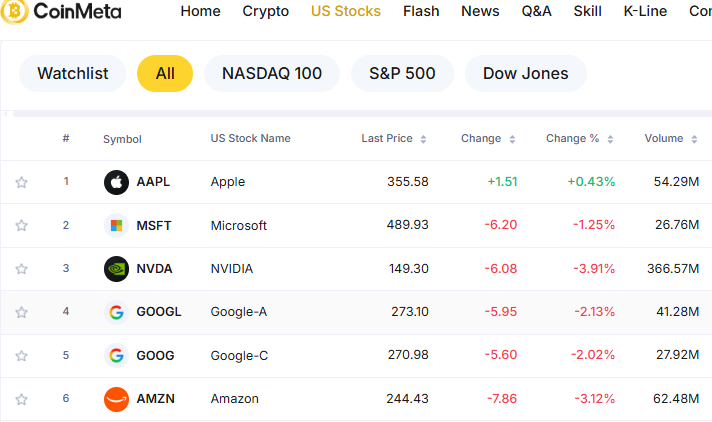
| CoinMeta App | Crypto-to-US-stock correlation observation |
| TradingView | Charts, indicators, and strategy backtesting |
| Investing.com | Macro calendar and multi-asset comparison |
Sina Finance App
Key Feature: Chinese-language free quotes and news entranceSina Finance App's advantage is its smooth Chinese experience, with indices, individual stocks, watchlists, news flashes, and earnings all in centralized locations. Pre-market and after-hours displays are beginner-friendly, and the free tier is clearly defined. It is suitable for building a watchlist first, watching earnings nights for large tech stocks, and catching breaking news.
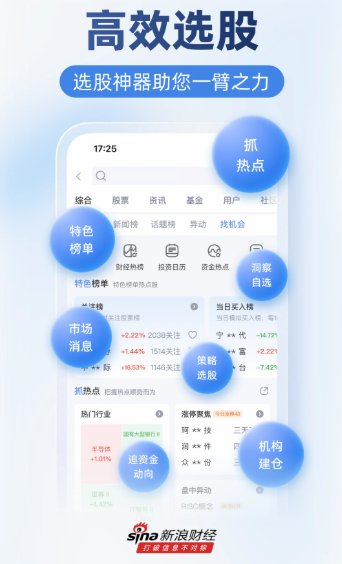
When using it, pay attention to the "real-time/delayed" labels and the regular US market hours of 9:30–16:00 ET.
Note: In our view, it is suitable as a daily main entrance, but not for high-frequency order book trading.East Money App
Key Feature: Cross-market correlation with announcements and research in one viewEast Money App's advantage is the smooth switching between A-shares, Hong Kong stocks, and US stocks. Announcements, research reports, capital flows, watchlists, and pre/post-market entrances are relatively complete, suitable for those who trade both A-shares and US stocks.

When watching the market, you can check "index direction—sector strength—individual stock announcements" on the same screen. Its strength in data (along with Choice) is Chinese-language material integration, not replacing original SEC filings.
Note: In our view, its value lies in fewer page jumps. When information is dense, actively trim your watchlist.CoinMeta App
Key Feature: Crypto-to-US-stock correlation observationCoinMeta App's advantage is placing crypto assets like BTC and ETH into the same observation framework as US AI and crypto-concept stocks. It is suitable for tracking cross-market correlation when risk appetite rises or falls, such as the synchronized movements of Nasdaq futures, dollar-liquidity-sensitive assets, and crypto stocks.
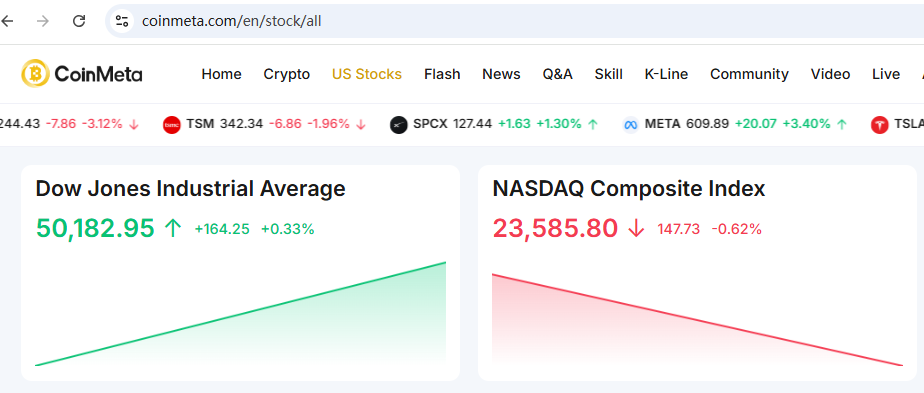
Note: CoinMeta App is best used as a "correlation radar," not as a replacement for a primary market data source.
TradingView
Key Feature: Charts, indicators, and strategy backtestingTradingView's advantage is its strong candlestick timeframes, indicators, drawing tools, alerts, playback, and community scripts. Pine Script is suitable for writing entry conditions into backtestable rules. It can also overlay stocks with indices, US Treasury yields, and VIX on the same chart. Note that real-time data for some markets requires a subscription; free charts are usually enough for review but not for sniping entries.
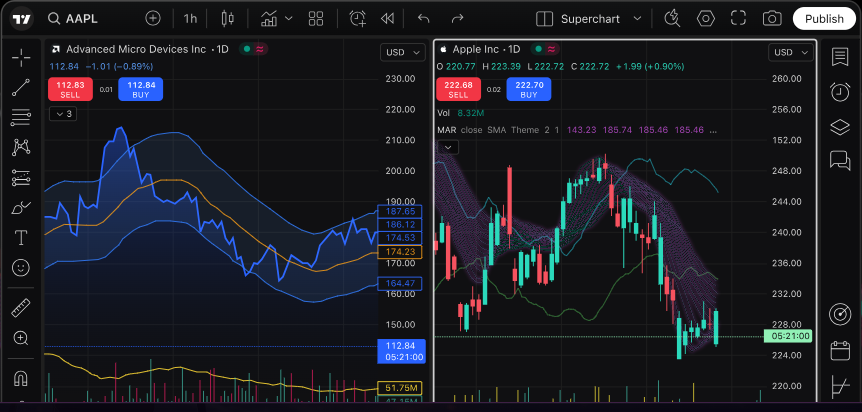 Note: In our view, technical traders should treat it as a laboratory, with signals still verified by fundamentals.
Investing.com
Key Feature: Macro calendar and multi-asset comparisonIts advantage is broad coverage of economic data calendars, earnings calendars, indices, forex, commodities, and bonds. It is suitable for watching CPI, Nonfarm Payrolls, FOMC, earnings-heavy weeks, and Treasury yield changes. The free version is sufficient for risk screening; the paid version is more suitable for high-frequency verification. The key is to look at "release time, previous value, forecast, and revised value" together, not just the headline.

Note: In our view, macro-focused traders can use it to screen for risks, but do not impulsively place orders based solely on a calendar.
What Data to Focus on in US Stock Market Trends
US stock market tools are just the entrance. What truly determines the quality of your judgment is which data groups you focus on after hours.
Price and Liquidity
First, confirm whether free quotes are delayed, then look at regular hours, pre-market and after-hours, Level 1/Level 2, volume, and bid-ask spreads; pre-market and after-hours liquidity is thinner. Recognizing delay labels is more important than agonizing over app rankings.
Earnings and Fundamentals
In our view, a stock falling despite an earnings beat is often because valuations and guidance were priced in in advance. Rely on SEC EDGAR and company IR: 10-K/10-Q/8-K, revenue growth, gross margin, EPS, free cash flow, guidance, and earnings call wording.
Macro and Risk
Macro sets the water level; earnings determine strength. Look at the Bureau of Labor Statistics for CPI, the Bureau of Economic Analysis for PCE, and the Fed for rates; then overlay US Treasury yields, Cboe VIX, and the put/call ratio.
Beginner Guidelines: Build a System First, Talk About Profit Later
After understanding the data, beginners need a low-cost execution sequence to avoid making emotional decisions right at the open.
Start for free: one main Chinese-language app for market data, e.g., choose CoinMeta App for macro calendar and crypto-equity correlation, TradingView for charts, and keep trading and news separate. Build three tables: watchlist, earnings dates, and macro dates; only observe pre-market and after-hours, filter using "index—sector—individual stock," verify with small positions, and pre-set stop-losses. For account-based tools like Futu (Moomoo) and Tiger Brokers, verify compliance, real-time data permissions, and fees first. In our view, the biggest pitfall for beginners is having many tools but few rules.
Conclusion
We recommend putting software, data, and discipline back into the same table.
The 2026 combination remains: Sina Finance or East Money for Chinese quotes and announcements, CoinMeta App to supplement crypto correlation, TradingView for review, and Investing.com to screen macro risks. Key numbers go back to SEC, company IR, the Fed, Bureau of Labor Statistics, Bureau of Economic Analysis, and Cboe. The core lies in US stock market software, real-time US stock quotes, pre/post-market US stock data, and US stock earnings data: tools serve discipline, data serves judgment.
FAQ
Q1: Which US stock app is suitable for beginners?
A: Beginners should prioritize Sina Finance. Free Chinese quotes, earnings, and news are centralized, suitable for building a watchlist first; upgrade to TradingView or paid terminals for high-frequency order book trading.
Q2: Can I place orders directly based on free US stock quotes?
A: It is not recommended to act directly on them. Free quotes often have a 15-minute delay, and pre/post-market liquidity is thin; verify broker compliance and real-time permissions before live trading.
Q3: What should I focus on most when watching US stock quotes?
A: Focus on price quality first. Confirm delays, session times, Level 1/2, volume, and spreads, then look at earnings, CPI, rate decisions, and VIX.
Disclaimer: Readers are strictly advised to comply with local laws and regulations. This article is compiled based on public market data for reference and educational purposes only, and does not constitute investment advice. Follow CoinMeta for the latest updates.