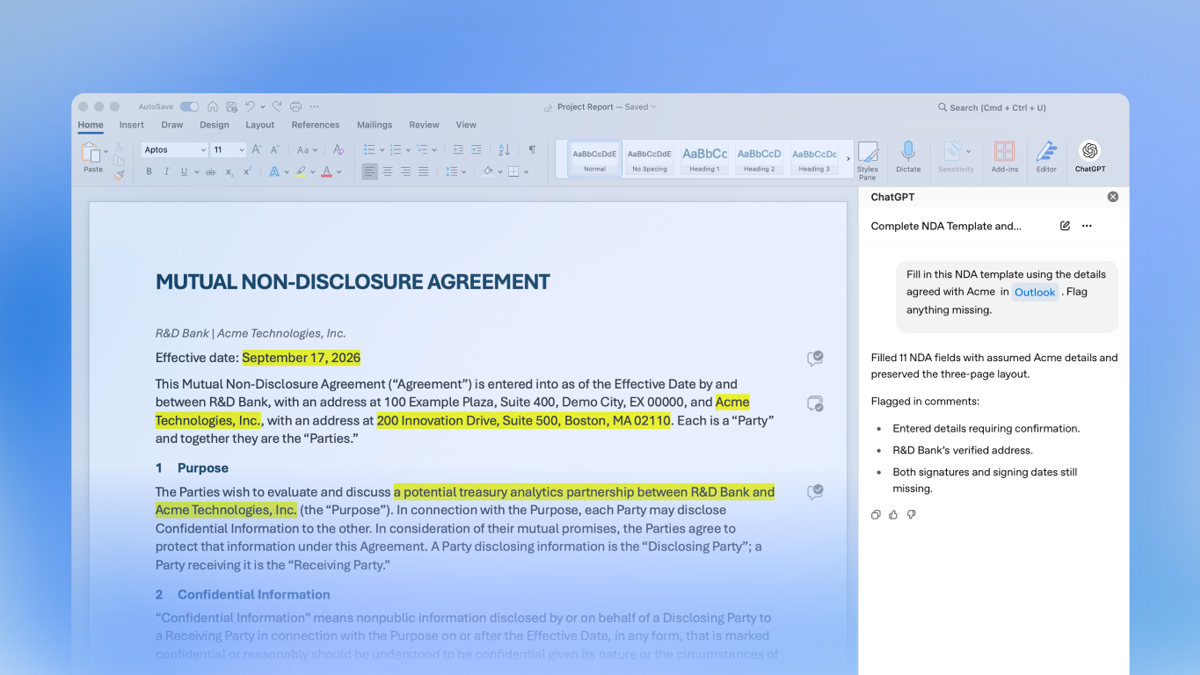

















Microsoft Word has finally incorporated ChatGPT into the sidebar. On September 17th, OpenAI updated its product description to state that ChatGPT, for, and Word are now available to all ChatGPT packages, including the free version. Users can directly draft content from notes, summarize long texts, rewrite selected text, and adjust titles and formats within the documentation. With this addition, Excel, PowerPoint, and Office join together; these three core tools can now be accessed through the same Microsoft Store plugin.
This message seems to be about the launch of a regular plugin, but what is truly noteworthy is the change in the user interface. In the past, when using the generative AI to process documents, the common procedure was to copy the text into the chat window, obtain the answer, and then paste it back into Word. Although the steps were not complicated, they would interrupt the editing flow and made it easy to lose context, style, and the location of modifications. With the new sidebar that places the model next to the original text, users can make continuous edits around the current paragraph. Starting from AI, the interface has evolved from being an external Q&A tool to becoming part of the writing interface itself.
OpenAI did not describe this launch as a set of independent new models. The Word plugin still uses the user's existing ChatGPT account and corresponding package capabilities. Free users can install it, but this does not equate to unlimited usage. The official has clearly stated that the Token limitations of the packages still apply; for packages that include advanced features such as Codex, Word will still share the usage with these features. The opening of the installation portal and the relaxation of computing power quotas are two different things.
From copy and paste to in-document collaboration, the changes occur in the workflow, not in the model parameters.
Word is most suitable for handling tasks with a clear context. For example, if meeting notes are already in a document, users can request that the sidebar organizes them into an abstract; if a report is halfway written, they can ask it to rewrite a certain section; or if the title hierarchy is messy, they can request a unified format. The model doesn't need to explain again and again "where this text comes from," and users can more easily see the correspondence before and after the modifications.
This type of interaction can improve local editing efficiency, but it cannot automatically ensure the accuracy of the entire article. The model can make sentences flow more smoothly, but it may change the factual meaning during the polishing process; it can also compress the length of the text or delete restrictive conditions. For high-risk content such as contracts, finance, medicine, and public news, users still need to verify numbers, dates, entities, and boundaries of responsibility item by item. A convenient sidebar does not turn probabilistic generation into authoritative editing.
Document permissions are also an issue that enterprise users must consider first. Which texts employees should hand over to plugins, whether accounts belong to individuals or organizations, and how administrators can control the installation and data flow all need to be confirmed in conjunction with the organization's ChatGPT settings and Microsoft's environmental configurations. This explanation of OpenAI focuses on the available features, but it does not mean that every company can bypass its own data classification, confidentiality, and compliance requirements. Documents containing customer information, unpublicized performance data, or protected materials cannot be uploaded and processed by default just because the tool is integrated into Word.
From the perspective of product competition, Word is not lacking in AI features. Microsoft has already incorporated Copilot into Office, and other writing assistants are also competing for a place in document creation. The advantage of ChatGPT lies in its user-familiar account system and cross-tool usage habits: the same person may conduct research on the web, revise drafts in Word, and analyze tables in Excel. Whether it can become a highly engaging tool depends on whether the sidebar can retain sufficient context, whether the format processing is stable, and whether usage restrictions will frequently interrupt the user's work.
For content teams, the most practical approach is not to have AI generate the final draft all at once, but to break down the task into smaller steps. First, let it create a structure based on the existing materials, then rewrite each section individually; retain the sources for paragraphs that contain data; finally, editors can unify the tone, verify facts, and handle copyright issues. This approach reduces mechanical processing and does not place the responsibility for judgment on the model. If a whole external manuscript is generated directly with just one prompt, the article often suffers from vague summaries, repetitive sentence patterns, and a lack of detailed information from the scene.
The expanded entry is freely accessible, but the real costs remain related to quotas, review processes, and organizational governance.
"The statement 'all packages are available' is most easily misinterpreted as 'everyone can use them indefinitely for free.' In reality, the free version is still subject to its own quota limitations, and even the paid version does not offer unlimited resources. When companies assess costs, they need to consider not only the subscription fee but also the costs of manual review, permission configuration, employee training, and rework due to errors. A tool that can quickly produce a draft may actually lead to higher overall costs if it allows errors to more quickly make their way into official documents."
The plugin will also change version control habits. In the past, editors could clearly know which paragraphs they had modified themselves. With the introduction of AI, it is now necessary to more explicitly maintain revision records. It is best to enable version history for important documents, leaving traces of the intended goals, supporting materials, and key changes. Teams can also stipulate which tasks allow the direct use of generated content and which must be reviewed by a second person, to avoid each employee deciding on risk boundaries based on personal judgment.
For ordinary users, the most immediate benefit of this new feature is the reduced need to switch between windows. Writing job applications, organizing study notes, and making long paragraphs clearer can all be done within Word. However, users still need to be cautious of the illusion that something may seem "completed" just because it is neatly formatted and flows smoothly. Neat formatting and a smooth tone do not guarantee the authenticity of the content, especially when the original notes are incomplete; in such cases, the model may use appropriate language to fill in the gaps.
ChatGPT for Word are now available, not just part of future plans; however, their effectiveness can vary depending on the package, document content, and organizational settings. What the official team has confirmed so far includes capabilities such as drafting, summarizing, partial rewriting, and formatting adjustments. There is no promise that it can replace professional editing, legal review, or fact verification. It is more accurate to think of it as a collaborative tool that gets closer to the actual text than as a machine that automatically completes documents.
The real change is not that Word suddenly learns to write, but that AI further integrates into the user interfaces that people have been using for many years. The more natural the entry point, the higher the frequency of use, and the less reliance can be placed on a simple warning like “Please use with caution.” Future competition will shift from whether a model can generate text to its ability to stably participate in complete workflows without compromising on permissions, format, or accuracy. This opening represents a first step towards that goal, but whether it can become a reliable daily tool will be determined by its long-term performance in actual documents.